

Microsoft Teams – Troubleshooting guide for your oral exam

By: Fred (but mainly Emma)
Unfortunately, Microsoft Teams doesn’t always behave like we want it to.
I know from my own experience in webinars and tests with my students.
I am also getting too many debriefs which start something like this:
“I logged in 15mins prior to the exam, the link took me to Safari which didn’t work, switched over to Chrome which worked with no problems – phew!”
“I was not able to open a link within the team’s app for more than 30 min, luckily I sent an email to MCA 10 minutes before the exam started. The examiner got informed about this and rescheduled.”
“Attempted to log on 15 mins beforehand. Link provided in the email wouldn’t connect, several further failed attempts….Stress levels rising while watching the clock ticking away fast. Re-boot computer, still no luck, called MCA and then eventually 4 mins late logged in via outlook calendar, and was greeted with the letters FW. Off we go…”
Don’t let this happen to you!
Let’s face the issue now, and not in your exam, by going through some essential checklists.
Technical Preparations
Read the Microsoft Teams guidance PDF the MCA sent you: It’s attached to your NOE email.
Check your upload/download internet speed: The MCA recommends a minimum of 10Mbps.
⚠️ Do a speed test! I use Ookla, but you can literally Google “speed test”

Device Age: Ensure your device is relatively new, ideally less than 3 years old, Why? because I have found that if the other person has an even older device (which a lot of the examiners do), then problems occur.
Operating System: Make sure it’s current.
Updates: Download the latest software updates.
Browser: Use Google Chrome, not Edge, Firefox or any unsupported browser.
Download the Microsoft Teams Application ahead of your examination.
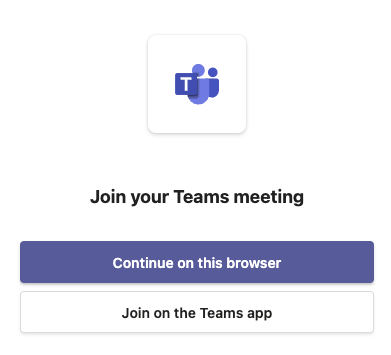
⚠️ Make sure to select “join on the Teams app”
The MCA does not want you to use the web version because it doesn’t have the full functionality, e.g. screen sharing. Using the web browser to connect is only used as a last resort and at the examiner’s discretion – we know certain examiners who won’t bother, so don’t rely on this.
Settings: Check your video and audio settings.
Testing: Practice using Teams before your exam – eg, with a study buddy - hint, hint!
Screen Sharing: Know how to start and stop screen sharing. (Hint: This is done via preferences on a Mac)
Restart your computer: Before exam day, do a proper restart to help prevent Teams, camera and microphone issues.
Exam Time
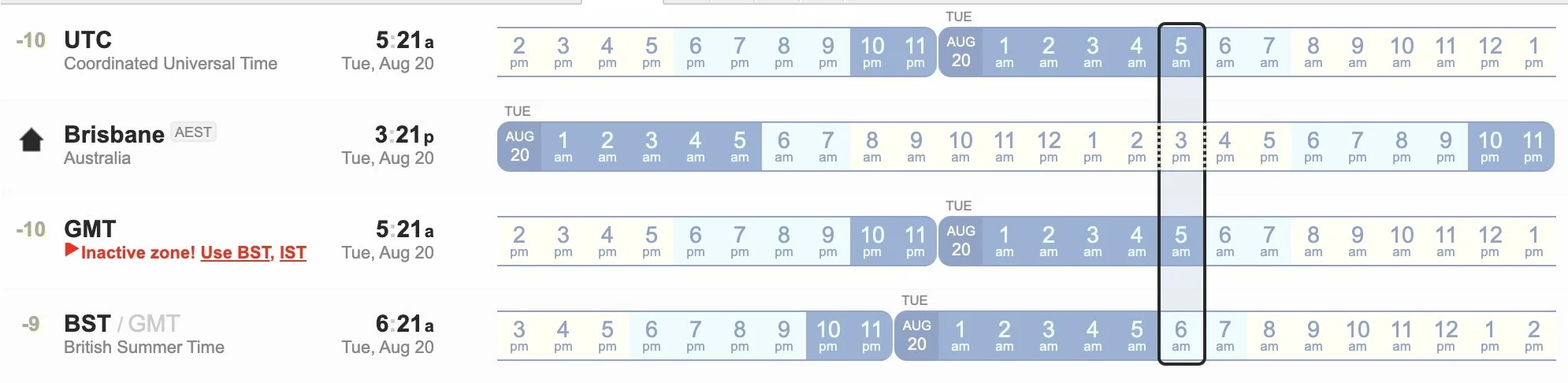
⚠️ Note: Exams are in the UK time zone. Mistakes happen when using the ICS file (Internet calendaring and scheduling) calendar. It does not account for British summertime/daylight saving.
Additional Critical Tips
Read the Candidate’s Code of Conduct - again,it’s attached to your NOE email.
Print out four pages of the radar plotting sheet.
Be Punctual: Join the Teams meeting 10 minutes before the scheduled exam time.
Dress Code: Business formal attire - suit, tie, belt, and dress shoes.
Photo ID: Passport or driving license for UK nationals, passport for foreign nationals.
Devices: You must have a desktop, laptop or tablet to take the exam.❗️Mobile phones are NOT allowed.
Room check: Ensure you can show the room clearly to the examiner. So, if you have a desktop, you will need a removable camera.
Training record log book - sometimes they ask to see it. (Not for M200).
Be prepared to focus your camera on any written work undertaken during the exam.
No background effects or headphones.
Nothing else open: Close all other files and documents.
Quiet room.
Clear desk.
Exam stationery: calculator, A4 plain writing paper, black pen, pencil, eraser, ruler.
Low ambient noise.
Closed exit door.
❗️WARNING: be aware if doing your exam in a rented space eg “We work” – we had an examiner who rescheduled a student due to the glass background.

What if I still can’t log in?
If you still can’t log in, here’s what you should do:
I recently confirmed this with the MCA Online Department -
“Good afternoon Emma - We do not have a telephone number for the online oral exams team, however, we ask candidates to email onlineoralexams@mcga.gov.uk within 5 minutes of the start of the exam”
🚨 Fred Tip: If this happens to you, take screenshots as evidence. If you don’t get a response via email within 5 minutes, call the main switchboard - 02038172000.
The code of conduct states:
1.2 The candidate must log in to the meeting at least 10 minutes prior to the designated start time. If the candidate fails to log in without reasonable explanation in advance, the exam will be classed as a ‘fail’. Candidates must email onlineoralexams@mcga.gov.uk within 5 minutes of the exam start time if they encounter connection issues or have not connected with the examiner at the exam start time. Failure to comply will automatically result in forfeiting the exam and loss of exam booking fee. Please note the examination times are UK Time. Either GMT / BST according to the time of year. Please ignore any reference to UTC.
Lastly
Don’t get this wrong - as how annoyed would you feel if you failed an exam because you couldn’t use teams?
#maybe I should not be an OOW if can’t use teams#